7 best healthcare automation software tools: Quick look
The 7 best healthcare automation software tools
1. DoctorConnect
Best for: Independent practices and specialty clinics that need configurable patient engagement workflows.

DoctorConnect is a patient communication platform running since 1992, covering appointment reminders, recall messaging, post-visit surveys, secure two-way texting, online scheduling, and digital forms. Heavily configurable per practice, provider, and specialty.
Key features:
- AI-powered recall: The LumiSight Health module flags patients due for follow-up and prompts outreach to bring them back in.
- CARE AI surveys: A drag-and-drop builder lets staff create and send patient surveys without technical help.
- KIRA digital forms: Patients complete and e-sign intake forms in a HIPAA- and SOC 2-compliant flow.
- 150+ integrations: Connects to more than 150 EHR and PMS systems to sync patient data automatically.
Pros:
- Broad EHR compatibility means most practices can connect without custom implementation work or IT involvement
- Custom rules and messaging by provider, location, or specialty
- Strong recall workflows for high-risk and overdue patient outreach
Cons:
- Patient-facing only, no provider-side ops automation
- Implementation requires discovery and configuration, no instant self-serve
- Not built for enterprise health system rollouts
Pricing: Starts at $50/provider/month for Patient Engagement Package (includes automated reminders, reactivation messaging, no-show follow-ups, 2-way texting, and other core automation tools).
2. Notable
Best for: Multi-site health systems building an AI-powered digital front door at scale.

Notable is built for large health systems that need a single platform to handle the full administrative arc (intake, scheduling, referrals, prior authorizations, care gap closure, and HCC chart review) without stitching together point solutions.
The low-code Flow Builder lets ops teams build and modify workflows without engineering support; Flow AI handles the routine decision-making inside those workflows.
Key features:
- Flow Builder: A low-code design tool that lets analysts or IT build automation workflows without heavy engineering.
- Flow AI: An in-platform assistant that helps configure and adjust automations as you build them.
- Prior auth and billing workflows: Prebuilt agents handle authorization submissions and billing tasks across payer portals.
Pros:
- Single platform handles intake, scheduling, referrals, prior auth, and care gap closure, reducing vendor sprawl
- Flow Builder lets ops teams ship new automations without engineering tickets
- Battle-tested across complex multi-site environments, reducing deployment risk for health systems with diverse EHR setups and care team workflows
Cons:
- Custom branching and payer-specific flows are built in Flow Builder by analysts or IT, often needing partner-led implementation
- Flows run touchless or assistive, so completion rates vary by payer, and some auths still route back to staff
- Prior auth runs through deep EHR integration, which fits teams on a supported EHR but adds setup weight for standalone payer portals
- Spans patient access, revenue cycle, and contact center, so teams that only need portal automation buy more than the workflow requires
Pricing: Enterprise (custom).
3. Kaizen Automation
Best for: Healthcare ops teams automating browser-based payer portal work, including credentialing, prior authorization, and verification of benefits.
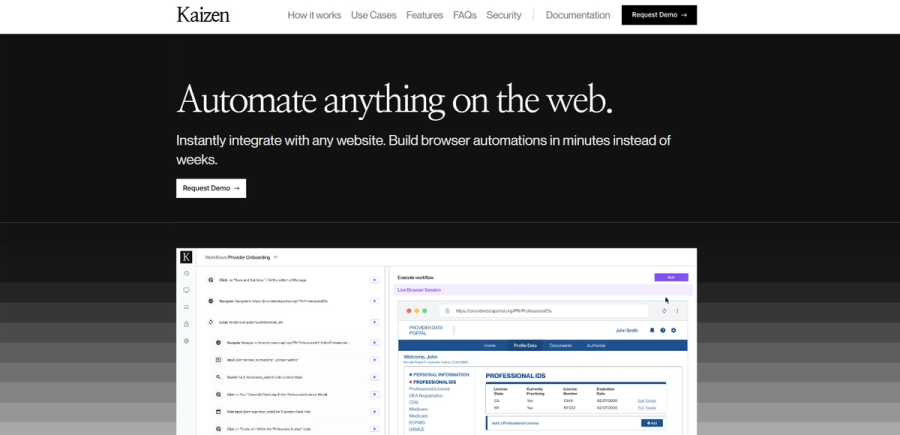
Kaizen automates the browser-based payer portal work that credentialing and ops teams handle by hand: CAQH logins, prior auth submissions through Availity, and VOB checks across multiple payer sites.
Workflows are defined in plain English, deployed with real-time monitoring, and integrated into existing systems via API or CSV. For VOB specifically, Kaizen handles the complex cases (browser-required portals and phone-call workflows) that API-based aggregators like Steady, Nirvana, and Sohar can't.
Key features:
- Browser automation on any web portal: Kaizen operates portals like CAQH, Availity, United, Aetna, NPPES, and state license boards the same way a staff member would.
- Plain-English workflow builder: Teams define automations by describing the steps in plain language, with no code required.
- Deterministic execution: Workflows run through generated code rather than AI inference, so the same process executes the same way every time.
- CAPTCHA and 2FA handling: Kaizen clears CAPTCHAs and two-factor prompts via email, TOTP, or SMS without manual steps.
- 2,500+ integrations: Connects to tools like Google Sheets, Slack, and EHR and PMS systems to move data in and out.
Pros:
- Handles legacy payer portals that don't offer APIs
- Ops teams build and edit automations without engineering tickets
- Same workflow runs identically every time, critical for high-stakes prior auth and credentialing accuracy
Cons:
- Doesn't extend to desktop applications; workflows must run in a browser or connect through email, fax, or document channels
- Designed for ops teams running payer portal work at scale; smaller practices with low auth or credentialing volume may not generate enough savings to justify the cost
Pricing: Usage-based, billed per browser hour, so cost scales with the portal work you automate. It typically lands at about one-third of the labor cost it replaces.
4. Medallion
Best for: Large digital health companies that want a fully managed credentialing service rather than a self-service automation tool.
Medallion is a provider network management platform that pairs AI-powered automation with a managed credentialing service. It handles credentialing, payer enrollment, licensing, and ongoing monitoring as a service, rather than handing tools to your ops team.
Key features:
- AI agent workforce: Medallion pairs automation agents with its own payer clearinghouse to process credentialing and enrollment work.
- NCQA-certified credentialing: Credentialing workflows meet NCQA standards and include primary source verification (PSV) on provider data.
- Payer enrollment automation: Medallion handles both direct and delegated enrollment to get providers contracted with payers.
- Cross-state license management: The platform tracks licenses, processes renewals, and monitors sanctions across multiple states.
- SLA-backed turnaround: Contractual service-level agreements set defined turnaround times for credentialing work.
Pros:
- Reduces time-to-credential for new providers; Medallion cites committee-ready files in as little as three days versus weeks of manual processing
- Removes the hiring and retention burden of in-house credentialing specialists, a role with high turnover and a tight talent market
- Dedicated account management reduces rollout risk for teams new to managed credentialing
Cons:
- Limited self-service options for companies that want to manage their own enrollments and tasks
- Built for credentialing-heavy operations; teams that also need to automate prior auth, VOB, or claims status checks will still need a separate browser automation tool
Pricing: Enterprise (custom, based on provider count, modules, and integration requirements).
5. Heidi Health
Best for: Individual clinicians and clinics that want AI ambient documentation across many specialties.
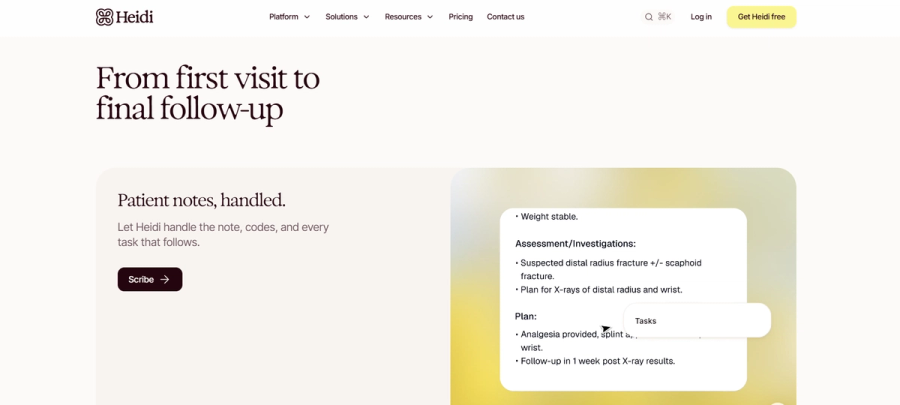
Heidi is an ambient AI scribe built for broad clinical use: generalist and specialist workflows, 110+ languages, across in-person and telehealth visits. It captures conversation during patient encounters and produces structured notes without dictation or post-visit documentation work.
Key features:
- Ambient AI scribing: Heidi generates clinical notes across generalist and specialist workflows without reconfiguration between visit types.
- Multilingual support: Handles patient encounters in more than 110 languages.
- Heidi Evidence: Clinical decision support surfaces guidance with citations from sources like BMJ, NICE, and HealthPathways.
- Heidi Comms: Patient communications run across voice, text, and chat from one place.
- Heidi Remote: A 21-gram wearable mic captures encounters with offline encryption.
Pros:
- Customizable note templates across many specialties, with adjustable SOAP, narrative, and structured formats per clinician
- Specialty-flexible templates mean clinicians across different disciplines can use the same tool without custom implementation work for each team
- Free tier makes it easy to test before committing
Cons:
- 2026 pricing climbed to $150 per user per month billed annually, upper end of the AI scribe market
- Documentation-only, not for ops automation or back-office workflows
Pricing: Free tier available; Clinician: $150/user/month or $110/user/month billed yearly; Evidence Plus: $40/user/month or $30/user/month billed yearly; Evidence Team: $50/user/month billed yearly; Practice: $180/user/month billed yearly; Enterprise: custom.
6. UiPath
Best for: Enterprise health systems with dedicated RPA developers and desktop-heavy, legacy back-office workflows that browser automation can't reach.

UiPath is the enterprise RPA incumbent in healthcare, with bots deployed across 75% of the top 100 US health systems and 400+ healthcare organizations. Its real strength is desktop and legacy back-office work with no modern API: revenue cycle, supply chain, and claims processing across older applications.
For browser-based payer portal work like credentialing, prior auth, and VOB, a purpose-built browser automation platform reaches the same workflows with far less developer overhead.
Key features:
- Cross-platform RPA bots: UiPath automates across desktop, web, Citrix, and legacy applications, not just browser-based portals.
- Healthcare bot templates: Pre-built templates cover claims processing, eligibility verification, and prior auth status checks.
- Centralized orchestration: A control layer schedules and manages bots across large, multi-process deployments.
- Enterprise governance: UiPath holds HITRUST CSF certification and a SOC 2 Type 2 attestation, with role-based access controls and full audit logging.
Pros:
- Large healthcare install base means a mature partner ecosystem and pre-built templates for revenue cycle and claims workflows
- Bots reach desktop, Citrix, and legacy applications, not just browser workflows
- Mature governance, audit, and compliance tooling for regulated enterprise environments
Cons:
- Heavy IT lift to deploy and operate, and bots break when the underlying applications change
- Requires dedicated RPA developers; not designed for ops teams to build and maintain their own automations
- Cost and complexity make it overkill for browser-based portal work and for small or mid-sized practices
Pricing: Basic starting at $25/month; Standard and Enterprise (custom); multi-component licensing typically scales with bot count and orchestration tier.
7. Qventus
Best for: Hospital operations leaders focused on inpatient capacity, OR utilization, and discharge planning.

Qventus is an AI platform built specifically for hospital operations, with AI Operational Assistants embedded in EHR workflows. It has been deployed across leading US health systems, including OhioHealth, Ardent Health, HonorHealth, and Northwestern Medicine.
Key features:
- Inpatient capacity and discharge planning: Automates capacity management and discharge planning to keep patient flow moving through inpatient stays.
- Perioperative care coordination: Coordinates surgical scheduling and prep to support surgical volume growth.
- Care Gap and Coding Automation Suite: Closes missed diagnoses and documentation gaps directly inside EHR workflows.
- Qventus AI Solution Factory: Lets teams co-develop custom AI assistants for their own use cases.
- Bi-directional EHR integration: Reads from and writes to major EHR systems to keep data in sync.
Pros:
- Deep hospital-only focus means the product is purpose-built for inpatient operational problems
- AI assistants take action inside existing EHR workflows rather than surfacing recommendations for staff to act on manually
- Addresses both operational efficiency and reimbursement accuracy through the Care Gap and Coding Automation suite
Cons:
- Hospital-only, not for outpatient practices, ambulatory clinics, or digital health companies
- ROI tied to length-of-stay and bed-capacity savings, payback weakens at lower inpatient volumes
- Doesn't address payer portal work, patient engagement, or clinical documentation
Pricing: Enterprise (custom).
How to choose the right healthcare automation software
Start with the workflow, not the vendor. Before evaluating features or pricing, confirm you're solving the right problem — a tool built for one workflow rarely transfers cleanly to another.
A few questions narrow the shortlist:
- Where is the manual work concentrated? If it's clinical documentation, look at AI scribes like Heidi. If it's payer portals, look at Kaizen. If it's patient reminders and recalls, look at DoctorConnect. If it's discharge planning and OR utilization, look at Qventus.
- Who owns the rollout? Enterprise RPA platforms like UiPath need IT and developer time. Tools with no-code workflow builders (Kaizen, Notable) put ops teams in the driver's seat without engineering tickets.
- What does failure cost? Browser-based ops tools should be deterministic, not generative, when accuracy is non-negotiable. A missed prior auth can cost a five-figure claim. Generative AI works well for clinical scribing, where a clinician reviews every note. It's not the best choice for high-stakes, unattended back-office work.
- What's the realistic implementation timeline? Enterprise RPA deployments can take 6 to 12 months. SaaS tools with tight scope (AI scribes, ops automation tools) often go live in weeks. Match the timeline to the urgency of the problem.
Pick a specialist, not a platform
Patient reminders, AI scribes, payer portal automation, and hospital ops AI solve different problems for different teams. The teams that get automation right start with their most expensive manual workflow.
For most healthcare ops organizations, that's payer portal work: AMA survey data shows physicians and their staff spend an average of 13 hours per week on prior authorization, and 40% of physicians have staff working exclusively on prior auth tasks.
Layer credentialing on top, and the case for automating that lane first becomes obvious. A specialist that owns its lane beats a platform that promises everything.
If payer portal work is where your team is losing the most time, book a call with Kaizen to see how browser automation handles it.
Frequently asked questions
What is the best healthcare automation software in 2026?
The best healthcare automation software depends on the workflow being automated. Kaizen specializes in payer portal automation (credentialing, prior auth, VOB); Heidi Health is widely used for AI clinical scribing; Qventus is purpose-built for hospital operations.
How much does healthcare automation software cost?
Healthcare automation software pricing ranges from per-user subscriptions (around $150/month for AI scribes like Heidi) to enterprise contracts (custom pricing for UiPath, Qventus, and Notable). Browser automation platforms like Kaizen use usage-based pricing, billed per browser hour, so cost scales with the work automated.
Is healthcare automation software HIPAA compliant?
Yes, reputable healthcare automation software is HIPAA compliant, and most leading platforms offer a Business Associate Agreement (BAA), often on paid or higher-tier plans. Most also hold SOC 2 Type II certification, with many adding ISO 27001 and HITRUST. Always verify BAA availability and compliance documentation directly with the vendor.
What's the difference between RPA and healthcare automation software?
The main difference between RPA and healthcare automation software is scope. RPA is one type focused on bots that mimic human interaction with desktop and web apps. Healthcare automation software is the broader category, also covering AI clinical scribes, patient engagement, browser-based ops automation, and hospital operations AI.
Can small practices use healthcare automation software?
Yes, small practices can use healthcare automation software, but only certain categories make sense at low volume. AI scribes like Heidi offer free tiers and per-user pricing, and patient engagement tools like DoctorConnect serve independent practices directly. Kaizen's ROI-based pricing still works for payer portal work once time savings are calculated.