What is UiPath?
UiPath is an enterprise automation platform that uses software robots to execute repetitive workflows across desktop applications, legacy systems, web portals, and document workflows. Orchestrator, its central management tool, handles scheduling, monitoring, and governance across an organization's full automation program.
For healthcare, UiPath targets revenue cycle management, prior authorization, claims processing, and denials at enterprise scale.
UiPath features
UiPath bundles a wide set of automation capabilities into one platform. For healthcare ops teams, what matters is where each feature actually fits a credentialing, prior auth, or RCM workflow and where it falls short.
- Orchestrator manages, schedules, and monitors automations from a single dashboard. Useful for IT teams running bots across multiple departments, but not for ops teams that don't need to orchestrate long-running enterprise workflows. Centralization comes with setup overhead through queue configuration, scheduling, and monitoring.
- Studio is the workflow builder. Developers and technical users design automations through drag-and-drop or code. It's strong for custom workflow development, but most healthcare ops teams don't have RPA developers in-house, which means either hiring one or relying on a vendor partner to build and maintain workflows.
- Document Understanding extracts and validates data from claims, prior auth forms, EOBs, and clinical records. It's useful for document-heavy RCM workflows, but pricing (0.2 PUs per page) means high-volume processing drives costs faster than expected.
- AI Center connects machine learning models to automation workflows, enabling decisions based on pattern recognition, which is powerful for teams with ML expertise. For most ops teams without a data science function, this capability stays unused while still factoring into the price tag.
- Self-healing UI automation detects interface changes and adjusts selectors automatically; genuinely useful for payer portals and EHR interfaces that update frequently. Only included on the Enterprise tier; on Standard, it's an additional purchase.
- Integration Service connects UiPath to external systems via APIs, covering a broad catalog of pre-built connectors for major SaaS, ERP, and CRM systems (Salesforce, ServiceNow, SAP, Microsoft 365, etc.). Helpful when the workflow is API-based.
UiPath plans: What healthcare teams actually pay for
UiPath's pricing page lists the $25/month Basic tier publicly. Standard and Enterprise are quote-based, and the real cost depends on robot count, deployment model, and consumption. The figures below are based on third-party procurement data from Vendr and analyst reporting from o-mega.
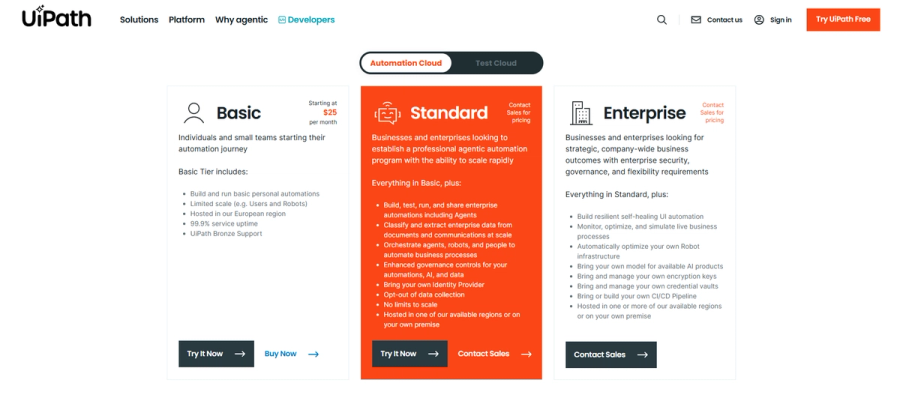
- Basic $25/month. Small team or evaluation use. Up to 5 Basic users, 5 Plus users, 1 Pro user, 2 robots, 1 tenant, 1 folder, and 6 months of cold data retention. EU-only hosting.
- Standard quote-based. Unattended robots list at $8,000-$10,000/year, attended robots at $3,500-$5,000/user/year. Mid-market deployments (10-50 robots) typically run $150,000-$500,000 annually all-in.
- Enterprise quote-based. Six-figure contracts are standard; 50+ robot deployments routinely exceed $1 million per year. Implementation adds 50-150% of first-year license costs.
For healthcare ops teams running credentialing, prior auth, and VOB workflows, the entry point is the Standard tier, putting annual costs in the low-to-mid six figures before implementation.
What UiPath reviews actually say
UiPath holds a 4.6 out of 5 rating on G2 and 4.5 out of 5 on Gartner Peer Insights. Those averages don't tell a credentialing team running CAQH updates and prior auth submissions whether the platform fits their workflow. Here's what reviews actually show.
What UiPath does well
UiPath handles complex, multi-system automation
UiPath performs best on workflows that span multiple systems, like navigating GUI-heavy steps, interacting with legacy desktop apps, and handling processes without APIs.
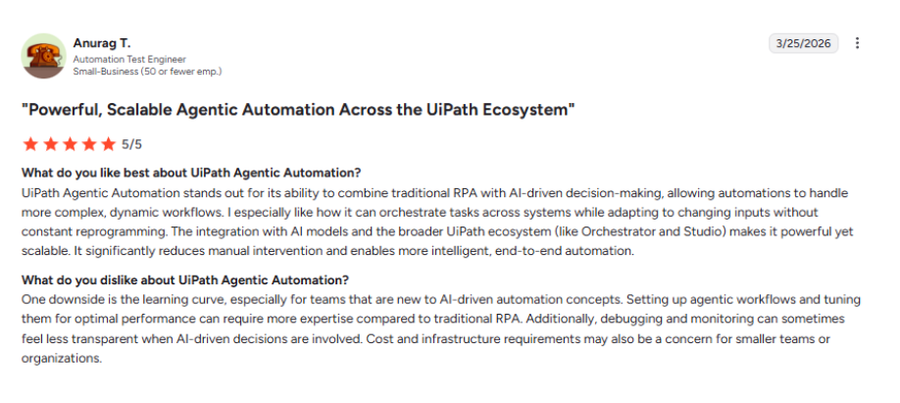
An automation test engineer shares that the platform can "orchestrate tasks across systems while adapting to changing inputs without constant reprogramming," freeing the team for higher-value work.
For ops teams running workflows across EHRs, billing systems, and payer portals, changes happen constantly. When payer portals update or fields shift, automations break unless they can adapt, which is exactly where UiPath's selector logic and self-healing capabilities come into play.
Published healthcare results
In one published implementation, Apprio used UiPath to automate claims processing for a large health system.
The case study reports backlog dropping by roughly 90%, payment authorization rates reaching 98.5%, and $100 million less tied up with top payers. It also shows a significant shift in claim aging, with 42-59% moving from 60+ days down to the 0-30 day range.
These results come from a large-scale RCM deployment with dedicated automation teams and significant claim volume, which shapes what's achievable.
Where UiPath falls short
Cost for smaller teams
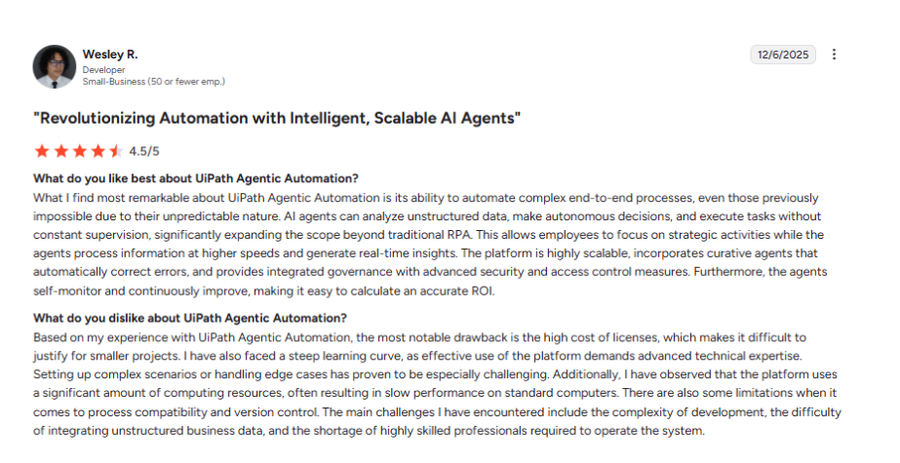
Reviews consistently flag cost as a concern, especially as usage scales. One user in computer software business noted that "licensing and infrastructure costs can become a concern when scaling, especially for smaller teams or projects with limited budgets."
Others point to high upfront setup costs, unclear consumption pricing, and ongoing maintenance, including retesting workflows after updates, which extends time to ROI.
Production automation requires ongoing maintenance
Maintenance after going live is also a common complaint. Platform upgrades can break existing workflows and require retesting, and advanced orchestration adds compute and configuration overhead as workloads scale.
A centralized automation team absorbs that. A three-person ops team managing credentialing and prior auth across 50 providers typically can't.
Low code has limits
UiPath positions itself as low-code, but actual users report that anything beyond simple tasks quickly becomes complex. Building and maintaining workflows often requires technical skill, and reviews on G2 and Software Advice frequently mention a steep learning curve for non-trivial use cases.
UiPath alternatives worth considering
If UiPath's enterprise footprint doesn't match your team's actual workload, these are the tools worth looking at depending on what you're trying to automate.
- Microsoft Power Automate: Best for Microsoft-heavy teams already running on Office 365, SharePoint, and Dynamics. Strong for internal workflows across Outlook, Excel, and Teams, but limited for payer portal work that requires browser automation. Starts at $15/user/month (annual billing).
- Make.com: Built for SaaS-heavy operations that need to connect cloud apps without writing code. Starts at $12/month (Core, annual billing) and covers integration-style automation across thousands of pre-built connectors, though it depends on the target apps having usable APIs.
- Kaizen: Designed for healthcare ops teams whose work runs through CAQH, Availity, payer portals, and state licensing boards. Priced against labor cost saved rather than per seat, which fits teams whose biggest expense is the staff doing repetitive portal work.
Is UiPath worth the cost for healthcare?
Bottom line for healthcare ops teams
Most teams have a first workflow live in under an hour.
Book a call to see how Kaizen runs your existing portal workflows.